What the System Efficiency Check actually tests
The check counts your traceable source in every well of the configuration, then compares each well’s measured efficiency against the stored efficiency that detector was calibrated to deliver. From those two values the firmware derives the per-well variance and reports it alongside a per-well PASS / FAIL. The footer rolls up the configuration: low / high / average efficiency across all wells, and the efficiency spread — the gap between the best and worst detector.
That’s the all-encompassing part. In a single count it answers three questions at once:
- Is each detector reading the right efficiency? — per-well variance vs. stored value. The pass-line is ±5%. Anything outside ±5% on a well triggers a FAIL on that well.
- Are the detectors reading the same as each other? — the configuration-wide efficiency spread (high minus low across all wells). A 5% maximum spread is the system-level pass line. This catches the case where every individual well is inside its own limit but the wells have drifted apart enough that detector-to-detector consistency is degraded.
- Is the source itself producing the activity the instrument expects? — the report applies the firmware’s automatic half-life decay correction from the source’s normalization date to today, so the comparison is against the source’s current DPM, not the value printed on a years-old certificate.
Most QA workflows in the industry treat detector-level efficiency, detector-to-detector balance, and source-decay tracking as three separate procedures. On a Genesys-platform counter they collapse into one report because they’re naturally measured together: when a calibrated source is in every well being counted, all three are in play at once. Testing them separately is more steps and worse signal.
How to read a System Efficiency Check
Below is an actual Genii System Efficiency Check — the same printout your operators see, in the same column layout the dot-matrix printer produces. The full annotated image lives on the Genesys Counters product page; the figure here is the same report, with each section called out:
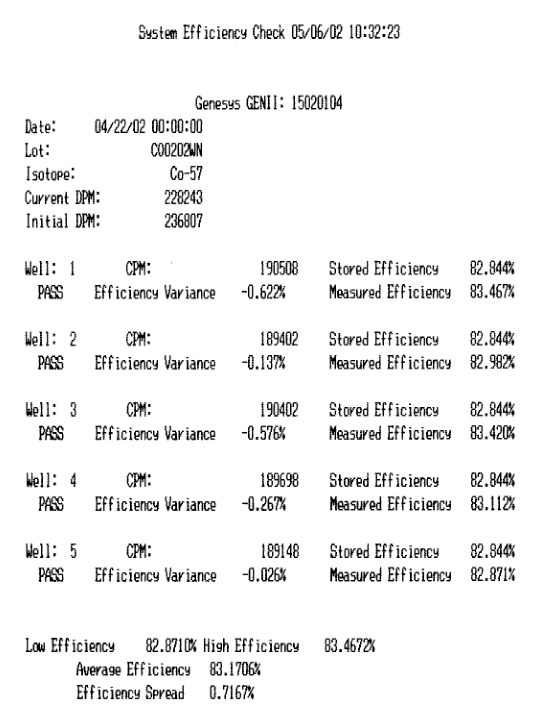
The report has three structural pieces, top to bottom: a header that identifies the instrument and the source (with decay math already applied), a per-well block that does the actual variance comparison and prints a PASS/FAIL for each detector, and an aggregate footer that derives the configuration-wide efficiency spread.
What each section is telling you
Header block — instrument and source identity
The header pins the report to a specific instrument (Genesys GENII:
- Initial DPM — what the source was certified to deliver on its calibration date.
- Current DPM — what the firmware computes the source is delivering today, after applying the isotope’s half-life decay from the normalization date forward.
The Current DPM is the one the per-well comparison uses. If the source you put in the well is the one named in the header, and the half-life and dates are correct, the Current DPM is your apples-to-apples reference for efficiency. The single most common source of a wrong-looking report is the source identity being wrong — an operator grabbed a different source than the one the report is configured against, or the source’s normalization date was entered incorrectly when it was first registered. The header is the place to verify that first.
Co-57 (271-day half-life) decays noticeably over months. A Co-57 source that was 236,807 DPM at normalization will be 228,243 DPM about 14 days later — that’s the situation in the report shown above. The firmware does the arithmetic, but you should be able to look at the two DPM values and the dates and have them make sense.
Per-well block — the actual variance test
Each well prints four numbers and a verdict:
- CPM — what that detector actually counted from the source.
- Stored Efficiency — the efficiency value that detector was calibrated to. Same number printed against every well in the report (because they were all calibrated to the same source).
- Measured Efficiency — the live efficiency computed from this run’s CPM against the source’s Current DPM.
measured eff = (CPM ÷ current_DPM) × 100. - Efficiency Variance — the gap between stored and measured, signed.
variance = stored eff − measured eff. Negative means the well is reading higher than the stored value; positive means it’s reading lower. - PASS / FAIL — the verdict. PASS if the variance is inside ±5%; FAIL if not.
The example report has well-1 reading −0.622% variance and the worst well at −0.026% — the whole configuration is sitting within a hair of its stored values. That’s normal for a healthy unit a couple of weeks out from calibration. When a well starts walking toward ±2% or ±3% variance, the detector isn’t broken yet (it’s still PASS) — but it’s the early-warning data you want to be tracking. Print the report, save it, and watch the variance number on each well over time.
Aggregate footer — configuration-wide spread
Below the per-well rows the report computes four numbers across the whole configuration:
- Low Efficiency — the lowest measured efficiency in this run.
- High Efficiency — the highest measured efficiency in this run.
- Average Efficiency — the mean across all wells.
- Efficiency Spread — High minus Low, in percentage points. 5% is the system-level pass line.
The example report’s spread is 0.7167% — well inside the 5% limit, which is what you want on a multi-detector counter. The spread number is the system check that the per-well variance test doesn’t catch on its own: it’s possible to have every well sit inside ±5% individually but to have one well drifted +3% and another drifted −3%, producing a 6% spread that’s outside the system limit even though every individual well still passes. That’s why both checks are reported — one tests per-detector calibration; the other tests detector-to-detector consistency.
For RIA work where you’re running tube replicates across wells, the spread number is arguably more important than any single per-well variance, because it directly drives between-detector reproducibility on the same assay.
What PASS / FAIL means — and doesn’t
Every-well PASS plus a spread inside 5% means the detectors are reading what they were calibrated to read, and reading it consistently with each other. It doesn’t mean the assays themselves are perfect — that depends on source preparation, tube handling, kit integrity, and a dozen other things upstream of the detector. But it does mean that the detector half of the chain is doing its job, and that any QA failures downstream aren’t the counter’s fault.
A single well in FAIL with the others in PASS narrows the cause to that detector or its preamp channel. The variance number tells you the direction: a large negative variance (well is reading too high) usually points to a gain drift; a large positive variance (well is reading too low) often points to a source-positioning issue in that specific well or a detector that’s lost some efficiency.
The whole configuration in FAIL with every well drifted the same direction is almost never a hardware issue. It’s almost always one of these: the source is decaying faster than the firmware thinks (wrong normalization date entered), the source identity is wrong, or the stored efficiency was calibrated against a different source.
Setting it up as a daily routine
The System Efficiency Check becomes useful when it’s run on the same schedule, with the same source, the same way every time. Inconsistent QA produces noise instead of signal.
- Designate a check source and keep it in the same labeled holder, used only for the daily check. Register it in the isotope library with its actual normalization date and initial DPM — the decay math depends entirely on those two values being right.
- Use the source the instrument was calibrated to. Co-57 is the conventional choice on multi-well counters because its mid-energy peak (122 keV) sits well inside the standard well-detector window and isn’t close to the edge. Cs-137 is also used. Whatever the choice, the daily check source has to be the same as the calibration source — otherwise the stored vs. measured comparison is comparing apples to oranges.
- Drop the source in every well, then run the check. On a multi-well unit the check counts each well in turn — one source moved between wells works fine, or a matched set sized to the configuration. Same procedure each morning.
- Run it at the same time each day, before any assays. First-thing-in-the-morning before the lab warms up gives you the most consistent thermal baseline.
- Let the printer or LTI Capture do the filing. Don’t transcribe by hand — the printout is the record. Run LTI Capture if you want a digital trend file you can open in Excel and plot variance per well over time.
Common patterns in real-world reports
"All wells PASS but one well’s variance is creeping toward 3% over months."
Slow detector drift on one channel. Expected as detectors age; not urgent while the well is still PASS. Plan to recalibrate that well before it crosses the 5% line and starts producing FAIL reports. If you have the source on hand, a routine Gain Adjust will pull that well back inside its stored value without affecting the others.
"Spread jumped from under 1% to over 5% with no individual well failing."
Two wells have drifted in opposite directions. Look for the highest and lowest measured efficiency in the per-well block — those are the two detectors moving apart. This is a system-level FAIL even though no single well is over ±5%, and it’s usually fixed by a configuration-wide recalibration rather than chasing one detector. Run Auto Cal across the whole configuration.
"Same well fails every morning by the same amount."
That detector’s stored efficiency is wrong. Either the detector was recently replaced and never recalibrated, or the calibration that detector got differs from the others, or the source positioning in that well is consistently different (well insert worn, holder doesn’t seat the same way as the others). Recalibrate the well; if it fails the same way again, check the well insert and source holder before assuming detector hardware.
"All wells fail with strongly negative variance — everything reads higher than stored."
The source the firmware is using for the comparison is producing more activity than expected. Two usual causes: the normalization date was entered as a date in the past that’s actually more recent than it should be (so today’s decay correction underestimates the current DPM), or you’re running the check with a freshly-purchased source while the firmware still has the old one’s normalization data in NVRAM. Re-register the source.
"All wells fail with strongly positive variance — everything reads lower than stored."
The source is delivering less activity than the firmware thinks. The most common cause is a source older than the firmware’s decay calculation accounts for — check the dates. Less commonly: a contamination event on the source holder is absorbing some of the photons before they reach the detector. Wipe-test the source holder.
"Spread is fine and all wells pass, but one well is consistently 0.5% higher than the others."
Detector-to-detector channel difference within tolerance. Not a problem. Real multi-detector configurations have small fixed offsets between channels — that’s why each detector has its own stored efficiency. As long as each well’s measured value tracks its own stored value, the per-detector AutoSpect math compensates and the assay results are accurate.
Why this matters more than it sounds like it does
Every assay your lab runs depends on the detectors being calibrated and consistent. If one well starts drifting on a Tuesday and you don’t notice, your tube-replicate variability quietly inflates from then until you catch it — possibly reportable to your quality program, possibly not, but at minimum requiring a review you didn’t plan for.
The System Efficiency Check exists so the window between "a detector drifted" and "you knew it drifted" is the next morning’s run. With a daily routine in place, the worst case is one day of suspect data. Without one, the worst case is months. The cost of running the report is a minute or two of time and the wear on a check source with a multi-decade useful life. The cost of not running it is, occasionally, having to defend assay results you didn’t have a way to defend.
Cheat sheet
- When: every morning before assays, plus after any service event or extended power loss.
- Source: the same source the instrument was calibrated against. Co-57 is conventional for multi-well counters; Cs-137 also works. Register it with the right normalization date and initial DPM.
- Setup: drop the source into every well, run System Efficiency Check. One source moved well-to-well is fine; a matched set is faster.
- Per-well PASS line: variance inside ±5% against stored efficiency.
- System PASS line: overall efficiency spread (High minus Low) inside 5%.
- Read the variance direction: negative = well reading too high (often gain drift); positive = well reading too low (often source positioning or detector aging).
- One well fails, others pass = isolated detector or channel issue. Recalibrate that well or check its source positioning.
- All wells fail same direction = source / normalization / decay-data issue. Verify the source identity and registered dates before touching calibration.
- Spread fails but no individual well fails = detectors drifted apart. Recalibrate the configuration.
- Don’t recalibrate on a single outlier. Re-run first; transient causes are common, permanent drifts are persistent.
- Print it (or LTI Capture it). The record is the QA artifact your audit asks for.
Further reading
- How Self-Calibration works (the two-peak method) — when the Check Efficiency Report flags a drift, this is the routine that recalibrates.
- Manual Calibration Procedure — when Auto Cal can't pull the detector back into range, this is the next step.
- "INVALID DPM" after calibration — what it means — one specific failure mode and how to recover.
- I-125 self-calibrator how-to — using kit tracer in place of a traceable source for ongoing efficiency tracking.
- Wiper Gold product page · Multi-Wiper™ · Genesys™ Genii
- LTI Capture™ — serial bridge that writes CSV/PDF/TXT in parallel with the printer ribbon, so daily check reports accumulate into a trend file automatically.